7 min read
Google Ads Conversion Tracking for Lead Generation: Forms and Calls
 Written byThomas FitzgeraldFounder, Your Digital Team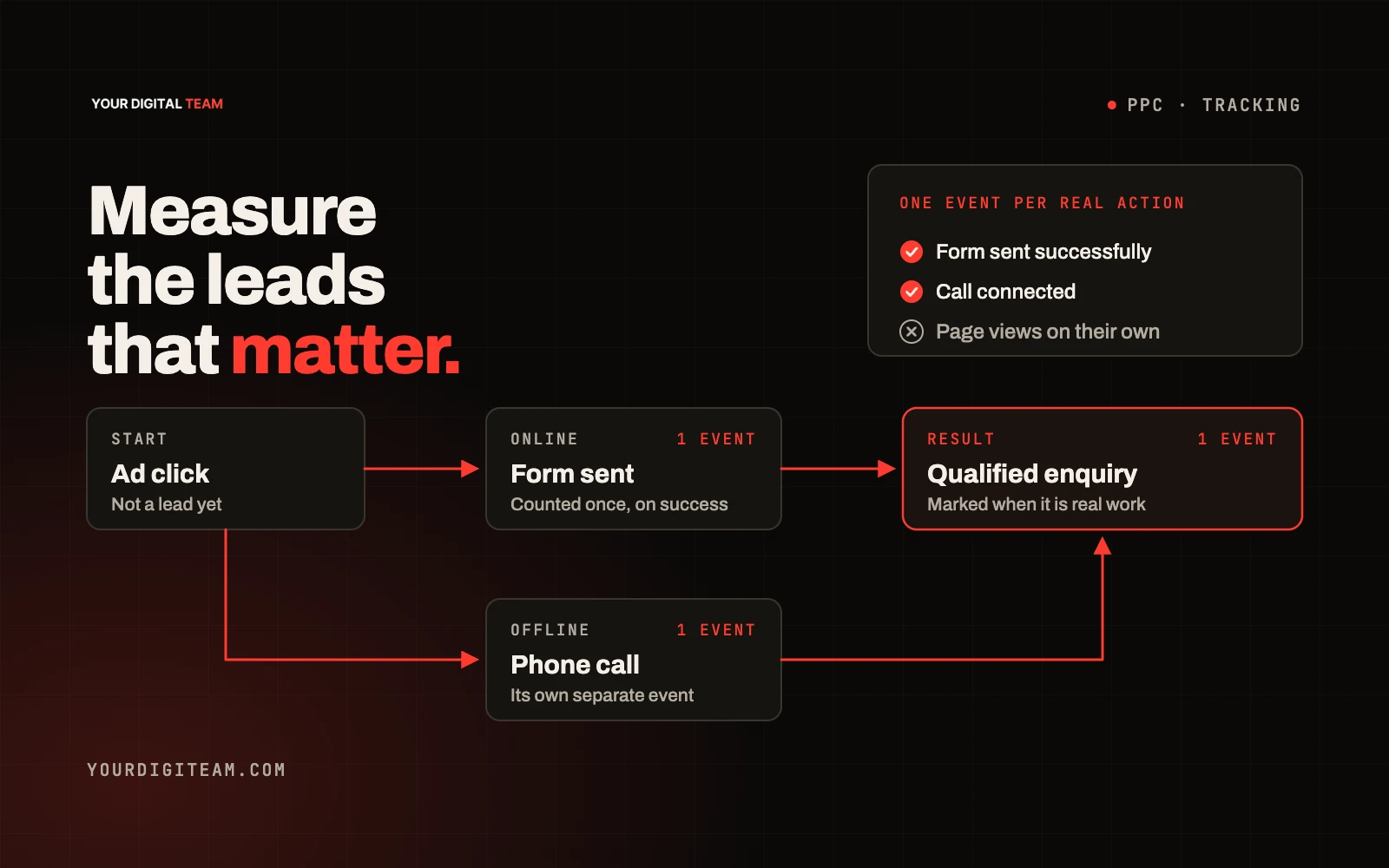
Paid mediaPublished 2 Oct 2026
Conversion tracking tells Google Ads which clicks turned into something valuable, such as a completed enquiry form or a phone call. Without it, you can see clicks and costs but not results, and Google's automated bidding has nothing meaningful to aim for. For a service business, a sound setup usually means tracking form submissions and calls, choosing carefully which of those count as your main goal, avoiding double counting, testing everything before relying on it, and then checking whether the "conversions" were actually good leads.
This guide is a planning framework rather than a click-by-click tutorial. Google's interface changes regularly, so for exact menu steps use Google's own help pages linked throughout.
Step 1: Decide what a conversion is for your business
Start on paper, not in the ad account. List every action a visitor can take that might lead to business:
- Submitting a quote or contact form
- Calling from an ad
- Calling a number shown on your website
- Tapping a phone number on your website on a mobile
- Booking online
- Starting a chat or sending an email
Then ask of each one: if this happened ten times, would I expect to win some work? Actions that clearly lead to enquiries are candidates for your main goal. Actions that only show interest, such as viewing a page or downloading a brochure, are useful to observe but usually shouldn't drive bidding.
Step 2: Understand primary and secondary actions
Google groups conversion actions into goals, and each action can be set as primary or secondary. According to Google's help page on primary and secondary conversion actions:
- Primary actions appear in the "Conversions" column and are used for bidding when their goal is used for bidding.
- Secondary actions are for observation. They're reported in "All conversions" but not normally used for bidding, unless they're part of a custom goal.
A practical rule: make your most reliable lead actions primary, and keep everything else secondary. If you mark lots of actions as primary, automated bidding treats all of them as success, including ones that rarely lead to work.
Example plan (illustrative)
| Action | Primary or secondary | Reason |
|---|---|---|
| Quote form submitted | Primary | Direct enquiry |
| Call from ad, above a minimum length | Primary | Genuine conversation likely |
| Call from website number, above a minimum length | Primary | Genuine conversation likely |
| Phone number tapped on website | Secondary | Shows intent, but doesn't confirm a call connected |
| Brochure download | Secondary | Interest, not an enquiry |
This is an example, not a rule. Your plan should reflect how enquiries really arrive.
Step 3: Track form submissions reliably
The most dependable way to track a form is to fire the conversion when the enquiry is actually submitted successfully, commonly by triggering on a thank-you page or a confirmed submission event, rather than on a button click that might fail.
Check:
- The conversion fires only after a successful submission
- Refreshing the thank-you page doesn't create extra conversions
- The thank-you page can't be reached by browsing or from search results
Counting: "one" or "every"
Google lets you count every conversion after an ad click, or only one. Its counting options guidance explains that "every" suits sales, where one person may buy several times, while "one" suits leads, where you usually want to count a single unique lead per click. For most enquiry forms, one is the sensible choice.
Step 4: Track calls properly
Calls are often where the best trade and service leads come from, so they deserve careful setup. Google's phone call conversion tracking overview describes several types, including:
- Calls from ads: calls made directly from call assets or call-focused ads, using Google forwarding numbers
- Calls to a phone number on your website: calls from people who clicked an ad, then called a forwarding number shown on your site
- Clicks on a phone number on your website: taps on a number on a mobile site
- Imported calls: calls tracked in another system and uploaded
For calls from ads and calls from your website, you set a minimum call length. Only calls at least that long count as conversions, which helps filter out wrong numbers and very short calls. Set it based on how long a genuine enquiry call usually takes in your business.
Tracking calls to your website number uses a snippet that swaps your displayed number for a Google forwarding number for visitors from ads. Google's guide to tracking calls to a phone number on a website explains what's needed.
A click on a phone number isn't a call. It shows someone tapped it, not that the call connected or lasted. That's why many advertisers keep it secondary if they also track actual calls.
Step 5: Avoid double counting
Double counting quietly makes performance look better than it is and misleads bidding. Common causes:
- The same form tracked twice, for example once through a Google Ads tag and again through an imported analytics event, both set as primary
- The same call counted in two ways, such as a phone tap and a forwarded call, both primary
- Counting set to "every" for leads, so repeat submissions add up
Fix: for each real-world action, have exactly one primary conversion action. Keep any duplicates secondary for comparison, or remove them.
Step 6: Test before you trust
Before relying on the numbers:
- Submit a test enquiry and confirm the conversion tag fires, using Google's tag troubleshooting tools (reports can take time to update)
- Check the tag fires only once per submission
- Make a test call longer than your minimum length and confirm it appears
- Check that tracking still works on mobile
- Re-test after any website change, especially form or template changes
Also check that your website's privacy information reflects the tracking you use and how consent is handled. Take proper advice if you're unsure what that means for your business.
Step 7: Compare conversions with real lead quality
A conversion is a signal, not a sale. Google can count a form submission as a conversion even if it's spam, a job applicant or someone outside your area.
Once a month, compare Google's figures with reality:
- How many conversions did Google report?
- How many real enquiries came through?
- How many were genuine, in your area, for services you offer?
- How many became quotes, and how many became work?
If the gap between reported conversions and genuine leads is large, look at your keywords, negative keywords, form spam protection and the page people land on. For a wider view on reading data honestly, see GA4, dashboards and vanity metrics.
Once you have enough reliable data, some businesses import qualified leads or closed sales back into Google Ads so bidding can learn from real outcomes. It's worth considering once the basics are solid.
Frequently asked questions
Do I need Google Tag Manager? Not necessarily. Many small sites can use the Google tag directly or through their platform's built-in integration. Tag Manager helps when you have several tags to manage.
Why don't my Google Ads conversions match my enquiries? Common reasons include reporting delays, attribution differences, duplicate tracking, spam submissions, and enquiries that didn't come from ads. Investigate the gap rather than trusting either number blindly.
What minimum call length should I use? One long enough to exclude wrong numbers and very short calls, based on your own call patterns. Review it once you have data.
Should I track calls if most customers phone? Yes. If calls are your main source of work and you only track forms, your reports and bidding will ignore most of your results.
Get your tracking checked
If you're not sure your conversions reflect real enquiries, we can audit your setup as part of our PPC service. Before spending more, it's also worth reading whether Google Ads are worth it and what Google Ads cost. Get in touch for an honest review.
Sources
- Google Ads Help — About primary and secondary conversion actions
- Google Ads Help — About conversion counting options
- Google Ads Help — About phone call conversion tracking
- Google Ads Help — Tracking calls to a phone number on a website