


6 min read
Social Media Content Calendar: A Two-Week Template and a Planning Routine That Sticks
 Written byThomas FitzgeraldFounder, Your Digital Team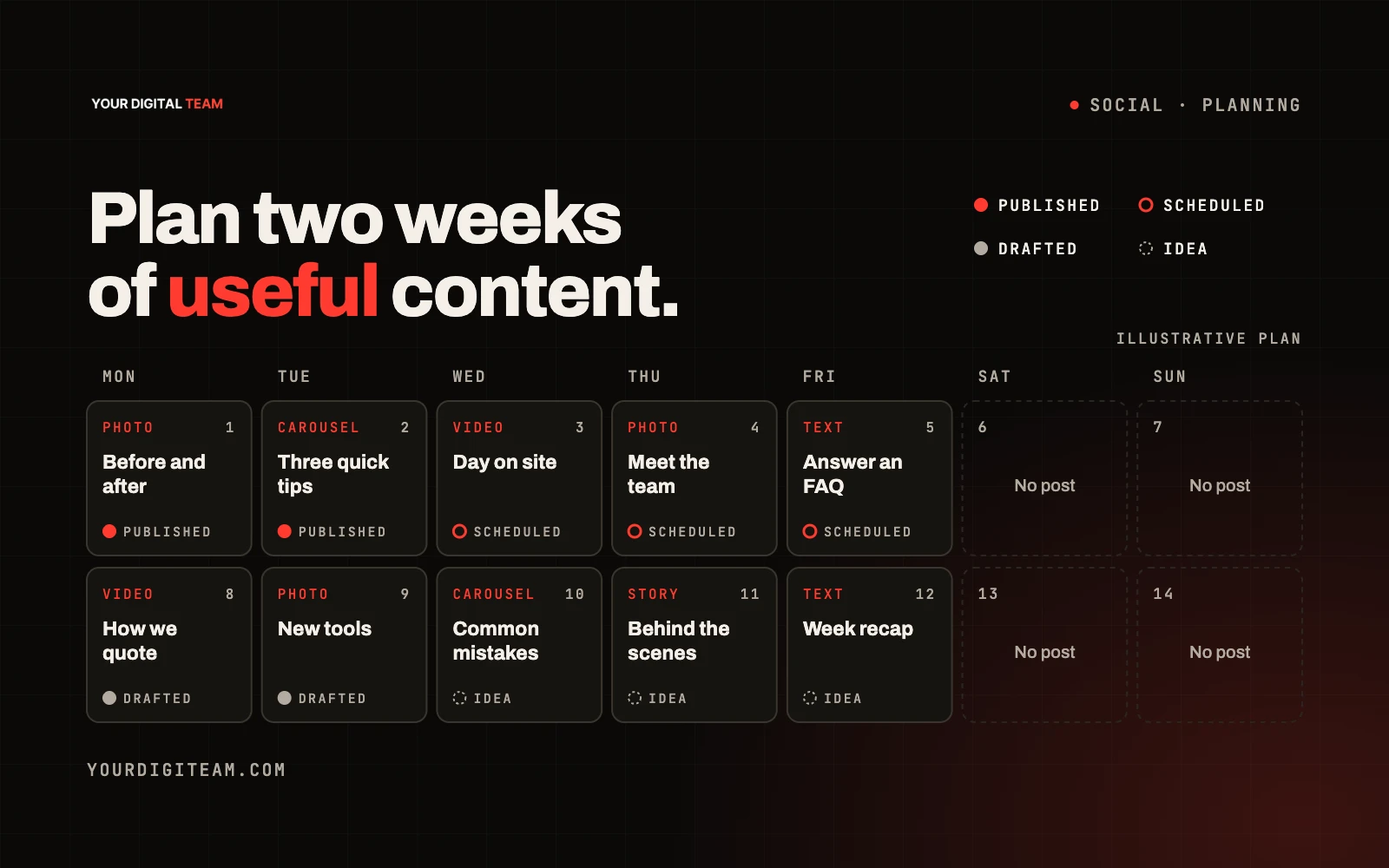
Social mediaPublished 9 Oct 2026
A social media content calendar is a simple plan of what you'll post, where and when, usually for the next one to four weeks. For a small business, its real value isn't the spreadsheet. It's the routine behind it: a short weekly session where you decide what to post, gather the photos, write the captions and schedule them, so you're not scrambling for something to say every morning.
This guide gives you a usable two-week template, a repeatable planning routine and practical tips for keeping it going. It assumes you've already chosen your platforms. If you haven't, start with which social media platform is right for your business. If you're thinking about the bigger picture of what content to make and why, see what a content strategy is.
What a content calendar should include
For each planned post, record:
- Date and time
- Platform
- Content type: photo, carousel, short video, text post, story
- Theme or pillar: which category the post belongs to (see below)
- Caption: the actual words, or a draft
- Visual: the photo or video to use, and where the file is
- Call to action: what you want people to do, if anything
- Status: idea, drafted, ready, scheduled, posted
- Notes: results or anything to remember
Step 1: Pick three to five content pillars
Pillars are the recurring categories you post about. They stop you starting from a blank page each week. Examples for a service business:
- The work: finished jobs, products, before and after
- Helpful tips: answers to questions customers ask
- Behind the scenes: the team, the process, the workshop
- Proof: reviews, testimonials (real ones, shared with permission)
- Offers and news: availability, new services, events
Aim for a balance weighted towards useful and interesting content, with promotional posts mixed in rather than dominating.
Step 2: Choose a realistic frequency
Consistency beats volume. Posting three times a week reliably is better than posting daily for a fortnight and then disappearing for a month. Choose a frequency you can sustain with the time and help you actually have.
The two-week template
Below is a fictional example for a small home-services business posting three times a week on one main platform. Copy the structure and replace the content with your own.
Week 1
| Day | Pillar | Type | Idea | Call to action | Status |
|---|---|---|---|---|---|
| Mon | The work | Photo carousel | Before and after of a recent job | "Get a quote" link in bio | Idea |
| Wed | Helpful tips | Short video | One quick tip for a common problem | "Save for later" | Idea |
| Fri | Proof | Graphic | A recent review, shared with permission | None | Idea |
Week 2
| Day | Pillar | Type | Idea | Call to action | Status |
|---|---|---|---|---|---|
| Mon | Behind the scenes | Photo | Team loading the van for a big job | None | Idea |
| Wed | Helpful tips | Carousel | "3 things to check before booking [service]" | "Message us with questions" | Idea |
| Fri | Offers and news | Photo + text | Availability for the coming month | "Book now" | Idea |
Blank template to copy
| Date | Platform | Pillar | Type | Caption | Visual file | CTA | Status | Notes |
|---|---|---|---|---|---|---|---|---|
A spreadsheet works perfectly well. Add a column per platform if you post in more than one place.
Step 3: The weekly planning routine
Block out 45 to 60 minutes at the same time each week. A routine that works for many small teams:
1. Review last week (10 minutes)
- What was posted, and what wasn't?
- Which posts got comments, messages, clicks or enquiries?
- Anything to repeat or drop?
2. Plan the next two weeks (10 minutes)
- Fill the calendar slots using your pillars
- Check upcoming dates: seasonal changes, local events, holidays, busy periods
3. Gather visuals (15 minutes)
- Pull photos and video from the week's jobs
- Make sure you have permission to use anything showing customers or their property
4. Write captions (15 minutes)
- Write all captions in one sitting
- Keep the first line strong, as it may be all people see
- Add a clear call to action where it makes sense
5. Schedule (5–10 minutes)
- Load posts into your scheduling tool
- Double-check dates, times and links
Step 4: Schedule the posts
Scheduling means posts go out even on busy days. Meta's own help centre describes using the Meta Business Suite calendar to plan ahead and schedule posts and stories for Facebook and Instagram, and explains how to create and manage posts there. Other platforms and third-party tools offer similar features; check each one's current limits, as scheduling features change.
Tip: scheduling doesn't mean ignoring. Check in daily to reply to comments and messages. That's often where enquiries come from.
Step 5: Build a "bank" of ideas
Keep a running list of ideas so planning sessions are quick:
- Questions customers asked this week
- Jobs worth photographing
- Seasonal reminders relevant to your service
- Myths or mistakes you see often
- Milestones: anniversaries, new equipment, new team members
Every time you think "that would make a good post", add it to the bank.
Keep it honest
- Only share reviews and testimonials that are real, and get permission
- Get consent before posting photos of customers, staff or identifiable property
- If you work with influencers or post sponsored content, follow the UK advertising rules on clearly labelling ads in the CAP Code
How to measure whether it's working
Focus on measures linked to business outcomes:
- Enquiries and messages that mention social media
- Clicks to your website
- Comments and saves on helpful posts
- Follower growth, as a secondary signal only
Review monthly. Do more of what leads to conversations and enquiries; do less of what doesn't.
Common mistakes
- Planning a month in detail and never looking at it again
- Posting only offers and sales messages
- Writing captions at the moment of posting
- Using stock photos when real ones would do better
- Scheduling and never replying to comments
Frequently asked questions
How far ahead should I plan social media posts? Two to four weeks works well for most small businesses. Leave room for timely posts that come up during the week.
Do I need special software for a content calendar? No. A spreadsheet plus a free scheduling tool is enough for most small businesses.
How many posts per week should I do? As many as you can keep up consistently and make genuinely useful. For many small businesses that's two to four a week on their main platform.
Can I reuse posts? Yes. Repurposing a good tip or project as a video, carousel or story is efficient and helpful.
Want it handled for you?
We plan, create and schedule content as part of our social media service. If you're weighing up costs, see how much social media management costs in the UK. Get in touch to talk it through.
Sources
- Meta Business Help Centre — Best practices for using the calendar in Business Suite
- Meta Business Help Centre — Create and manage posts in Meta Business Suite on desktop
- ASA / CAP — The CAP Code (non-broadcast)